Sept 14, 2026 • By M Gilang Januar
VoiceTaking v2: No Bot Joins Your Call
VoiceTaking started life as a voice notes app. You pressed record, spoke, and got back a transcript you could shape with an AI writing assistant. People used it for brainstorms, for journaling, for dictating drafts on a walk.
Then we looked at what they were actually recording. Over and over: meetings. Propping a laptop next to a speakerphone. Recording a Google Meet call on a phone and uploading the file afterwards. Typing frantically through a client call because the transcript only ever caught one side of it — theirs.
So we rebuilt the product around that. This is VoiceTaking v2: a meeting note taker that hears the whole room, and does it without a bot joining your call.
Three things define v2:
- The whole room, not just your half. Meeting audio and your microphone, captured on separate channels and transcribed live.
- No bot, no integration, no calendar access. Nothing joins your call, because you are already in it.
- A desktop app, coming next. Everything below works in the browser today; the desktop app removes the last limits.
The bot tax
Most meeting note takers work the same way: you connect your calendar, they send a bot into your call, and that bot sits there as a participant. It works, technically. But it comes with a tax that everyone has quietly agreed to pay:
- It shows up in the room. "Notetaker has joined the meeting" is a line in the participant list, and somebody always has to explain it.
- Someone has to let it in. Waiting rooms, external guests, locked meetings, a host who isn't you — every one of those is a way for the bot to be stuck outside while the meeting starts without it.
- It changes the conversation. A visible recorder in a candidate interview or a sensitive client call is not a neutral object. People speak differently around it.
- It wants the keys. Calendar access, and often an account on every platform you use, so that a robot can be admitted to a call you are already sitting in.
You are already in the meeting. Your computer is already playing the audio. Asking a second, remote participant to dial in and listen on your behalf is a strange way to solve the problem.
What we do instead
VoiceTaking captures the meeting from the browser you are already using.
When you start a capture, you pick the tab your call is running in and tick "Also share tab audio". That gives us what the other participants are saying. Your microphone covers your side. Both are transcribed live, on separate channels, so the notes always know who was talking.
Nothing joins your call. Nothing appears in the participant list. It works with Google Meet, Zoom in the browser, Teams, Whereby, a Discord call, a webinar you're only watching — anything that makes sound in a tab. There is no integration to set up, because there is no integration.
Two sources, kept straight
Two audio sources means two channels, and two channels means attribution that doesn't depend on guessing who is who inside a single mixed recording. Your side is your side. The call is the call. Within the call audio, speakers are separated too, so a three-way conversation doesn't collapse into one wall of text.
It's multilingual by default. If your team switches language mid-sentence, the transcript follows.
Notes and transcript, side by side
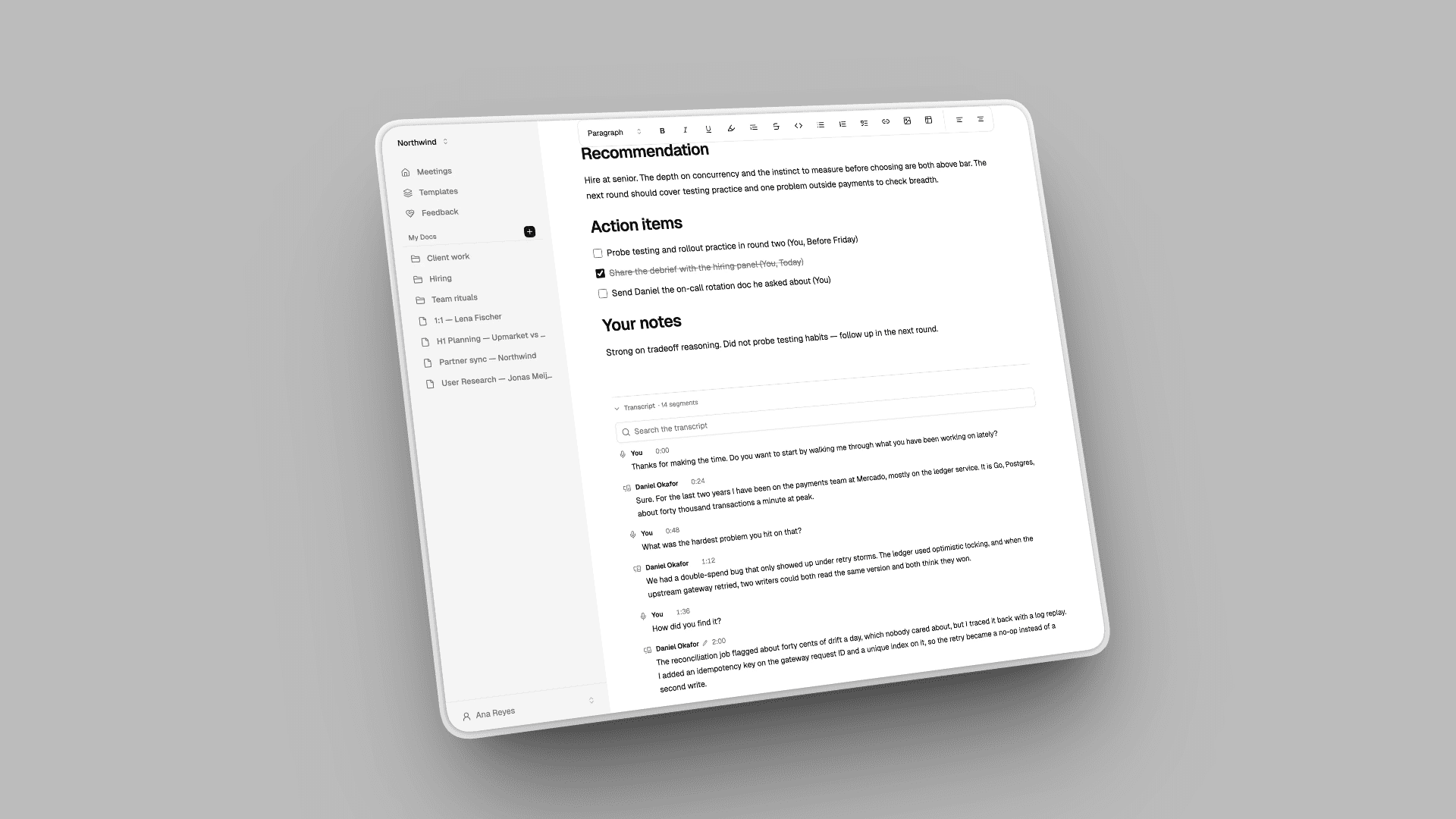
The live transcript sits next to an editor while the meeting is happening. Type what matters and let the transcript catch the rest. Anything you write before the call is kept and treated as fact when the summary is written, so an agenda you paste in beforehand genuinely shapes the output.
If you'd rather watch the call full-screen, pop the live transcript out into a floating window and keep it on top of everything else.
Templates decide the shape of the summary
A technical interview needs a scorecard. A strategy review needs decisions and the metrics behind them. A standup needs blockers. "Summarise this meeting" gives all three the same shapeless paragraph.
So you pick a template first and the summary takes that shape, with its own sections — plus action items pulled out with an owner and a due date. The templates are editable, and you can write your own.
It ends by itself
Capture saves and closes when you stop sharing the tab, or when nobody has been audible for a few minutes. The summary is written server-side afterwards, so you can close the tab the moment the call ends and come back to finished notes.
Two smaller things that came out of using it ourselves. Muting yourself inside Zoom is invisible to the browser, so there's a Mute mic control in VoiceTaking that actually keeps your side out of the notes. And the recording is kept and plays back against the transcript, for the thirty seconds you need to hear again.
If you already use VoiceTaking
Nothing you have is going away. Your recordings, transcripts and notes are where you left them, and the AI writing assistant still works the way it always did. Meetings are simply what the product is built around now.
The honest limits
Capturing another tab's audio is a browser capability, not a trick, and not every browser has it:
- Chrome or Edge on a desktop gets the whole thing — meeting audio and your mic.
- Safari and Firefox can record your microphone, but can't share another tab's audio. Mic only.
- Phones and tablets can't share another app's audio at all. Mic only.
We'd rather say that here than have you discover it during a call that matters. It is also the reason we are building a desktop app.
Next: the desktop app
Tab capture is a browser capability, and that ceiling is the browser's, not ours. So VoiceTaking v2 ships with a desktop app in progress.
Capturing at the system level instead of the tab level changes what's possible:
- Any app, not just a tab. The Zoom or Teams desktop client, a native Slack huddle, a phone call routed through your machine — if it makes sound, it can be captured.
- No tab picker. Start a capture without being asked which tab to share, every single time.
- Whichever browser you like. The Chrome-and-Edge-only limit above is a browser constraint. The desktop app doesn't inherit it.
- Survives a closed tab. Capture belongs to the app, not to a page you might navigate away from mid-call.
Mac first, Windows next. Your account, recordings, transcripts and templates are the same on both — the desktop app is another way into the same workspace, not a separate product.
Want to be in the first round? Start using VoiceTaking and we'll email you when the build is ready, or tell us which platform you need at [email protected].
Try it
Start a meeting — no credit card, nothing to install, no bot to explain. Open your call, start capture, pick the tab.
If it doesn't behave the way you expect, tell us: [email protected].