Oct 10, 2026 • By M Gilang Januar
Walk Into Every Meeting Prepared
There is a moment in most important calls that decides how the rest of it goes. The client's IT lead leans in and asks where the data actually lives. The candidate asks what on-call looks like. The partner asks whether the discount still stands if they sign this quarter.
You knew the answer. It's in the security overview, the pricing page, the email thread from last week. It just isn't in your head at the moment someone asked.
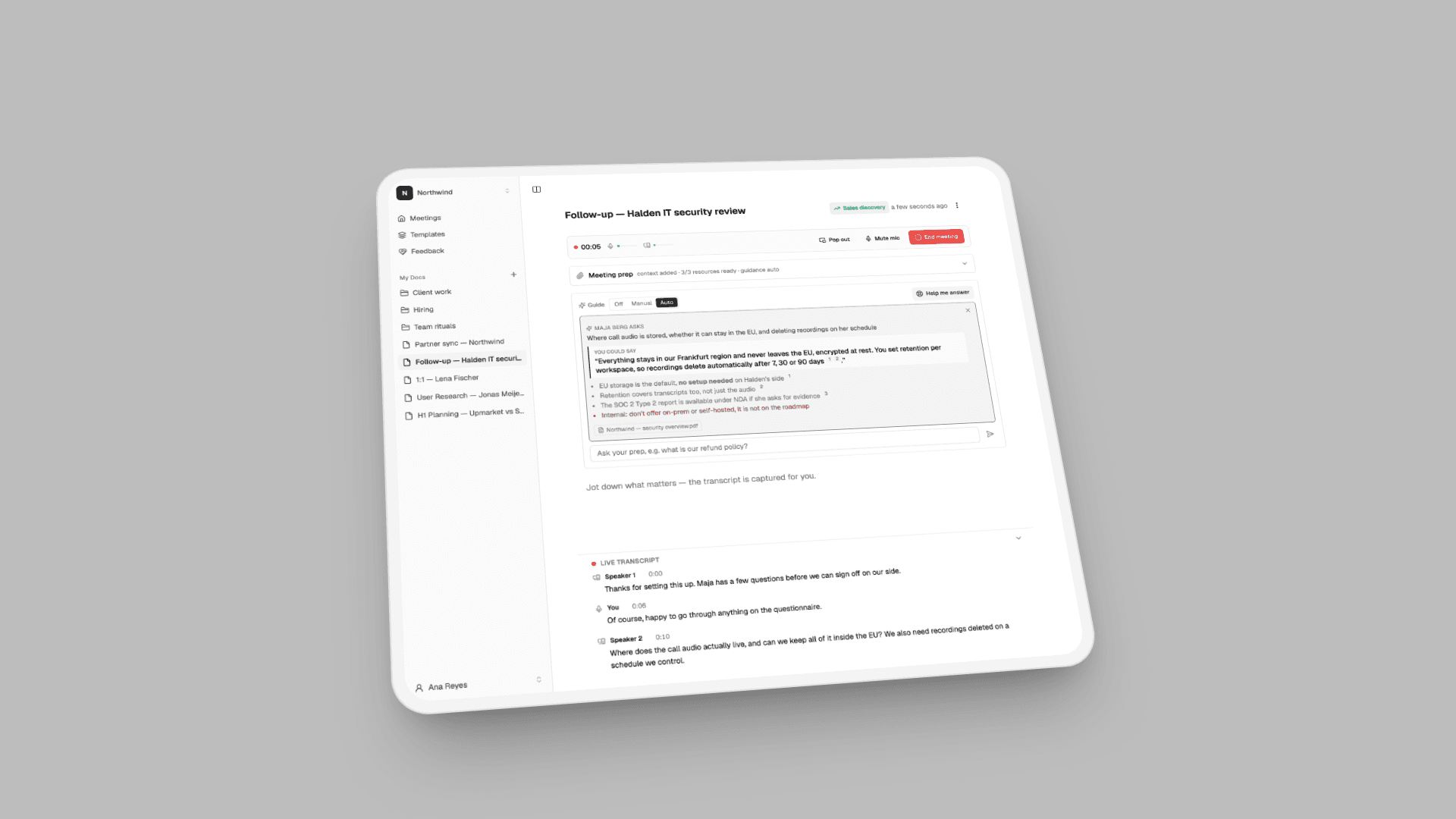
VoiceTaking already captures the whole call and writes it up afterwards. Now it helps during the call too: you prepare before the meeting, and a live guide uses that prep to suggest what to say when someone puts you on the spot.
Before the call: meeting prep
Every meeting now has a Meeting prep card. Open it before you start and give it two things.
Context and instructions. A few lines in your own words: who you're meeting, what you want out of it, what to push for, what not to promise. For example:
Goal: clear the security review so Erik can sign 60 seats this quarter. Maja will push on data residency and retention. Do not promise on-prem. Discount ceiling is 10% for an annual commit.
The guide follows this during the call. It's also the difference between an assistant that knows the facts and one that knows what you're trying to do with them.
Reference material. Drop in what you'd otherwise have open in twelve tabs:
- Documents: PDFs, Word, PowerPoint and Excel files (and their OpenDocument equivalents)
- Images: a screenshot of a pricing table or a photo of a whiteboard, read for its text
- Links: a web page or a hosted PDF, fetched and read
Each item is read, split into sections and indexed as it arrives. You'll see "3/3 resources ready" on the card once it's done. Prep belongs to that one meeting, so the material for a client call doesn't leak into your interview the next morning.
During the call: the live guide
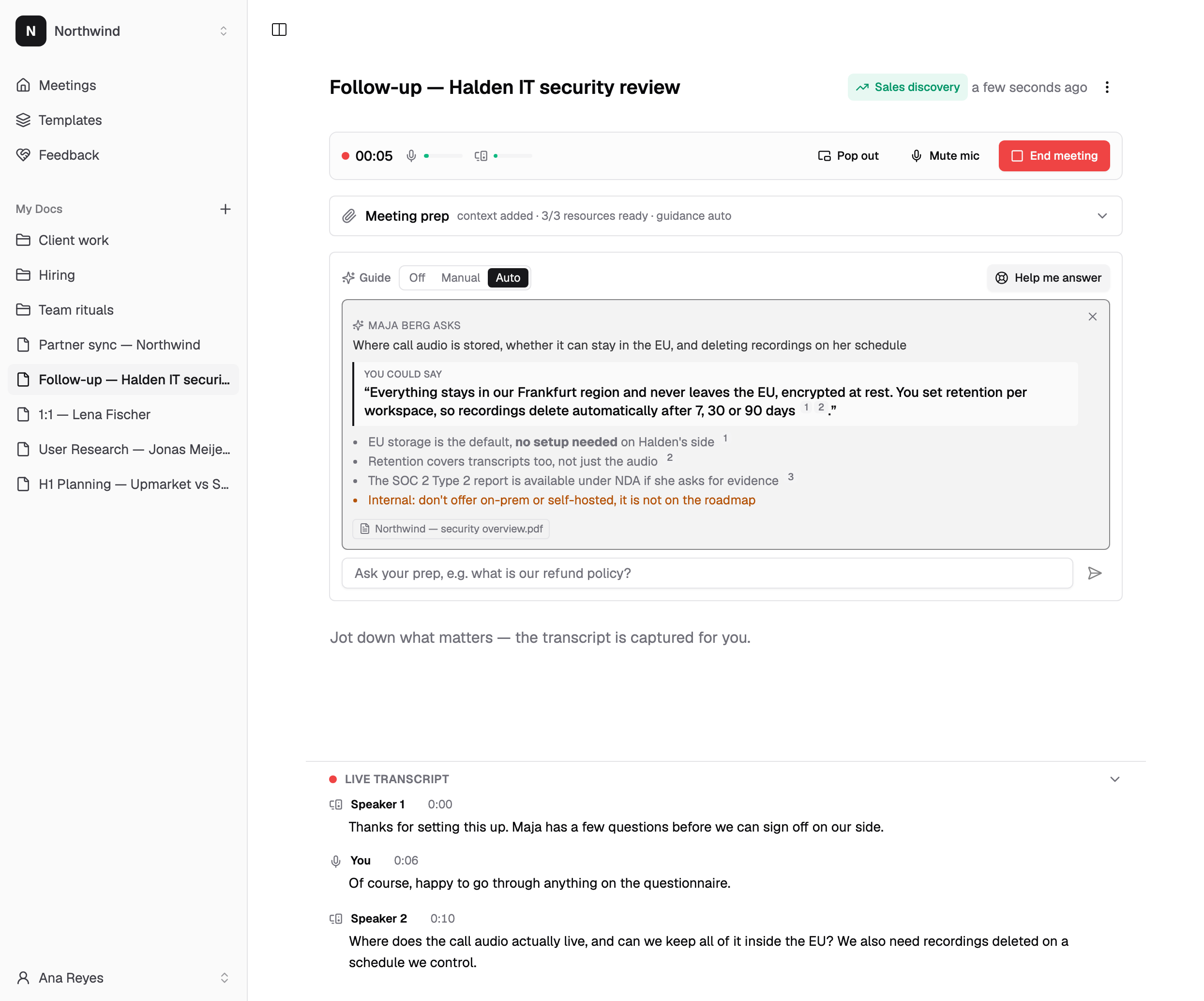
Start capture as usual. The prep card folds away and the Guide takes its place, next to the live transcript.
When someone asks you something your prep can answer, the guide shows a card with three parts:
- Who asked, and what. "Maja Berg asks: where call audio is stored, whether it can stay in the EU, and deleting recordings on her schedule." A rambling question, restated so you can check it understood.
- Something you could say. One or two sentences, phrased to be said out loud, not read off a slide.
- The supporting points. The details behind the answer, each numbered against the document it came from, so you can see it wasn't made up. Anything from your instructions that you shouldn't say out loud, like "don't offer on-prem", is shown separately and marked internal.
Sources are listed as chips under the answer. If your prep doesn't cover the question but the answer is public, like another company's announcement, a definition or something current, the guide can search the web and cite the page instead.
Three modes, because every call is different
The guide has three settings, and you can change them mid-call:
- Auto. The guide listens and steps in on its own when another participant asks you something your prep can help with. It waits until they finish their sentence. If you start answering, it assumes you've got it and stays quiet. Small talk doesn't trigger it.
- Manual. Nothing appears until you ask. Press Help me answer when you're put on the spot, or type a question into Ask your prep, like "what's our refund policy?", and get an answer drawn from your material.
- Off. No guidance. Capture and the summary work exactly as before.
Manual is the default. Auto is good for calls where you're mostly listening and the questions come at you; Manual is good when you want the transcript and your own judgement, with backup on request.
Full-screen calls
If the call takes up your whole screen, pop the live transcript out into its floating window. The guide comes with it, so the suggestions stay on top of the meeting instead of behind it.
After the call
Nothing changes about how a meeting ends. Capture stops, the summary is written in the shape of your template, and the action items are pulled out. Your prep stays with the meeting, so the next time you meet the same people, the context is already there.
What it won't do
- It doesn't speak for you. Every suggestion is yours to use, reword or ignore. Nothing is said or sent on your behalf.
- It doesn't invent facts. Answers come from your prep or a cited web page. If neither covers the question, it says so instead of guessing.
- It isn't a bot in the call. Like the rest of VoiceTaking, it works from the audio your browser already hears. Nobody else on the call sees it.
Meeting prep and the live guide are part of the paid plans, alongside live transcription and summaries.
Try it
Open your next important meeting a few minutes early, add the documents you'd normally scramble for, and write two lines about what you want from it. Start a meeting.
Questions or feedback: [email protected].